WhatsApp and CRM Automation for Restaurants in Saudi Arabia: A Practical Guide
How restaurants in Saudi Arabia can automate WhatsApp enquiries: instant replies, branch routing, booking reminders, CRM capture and reporting.
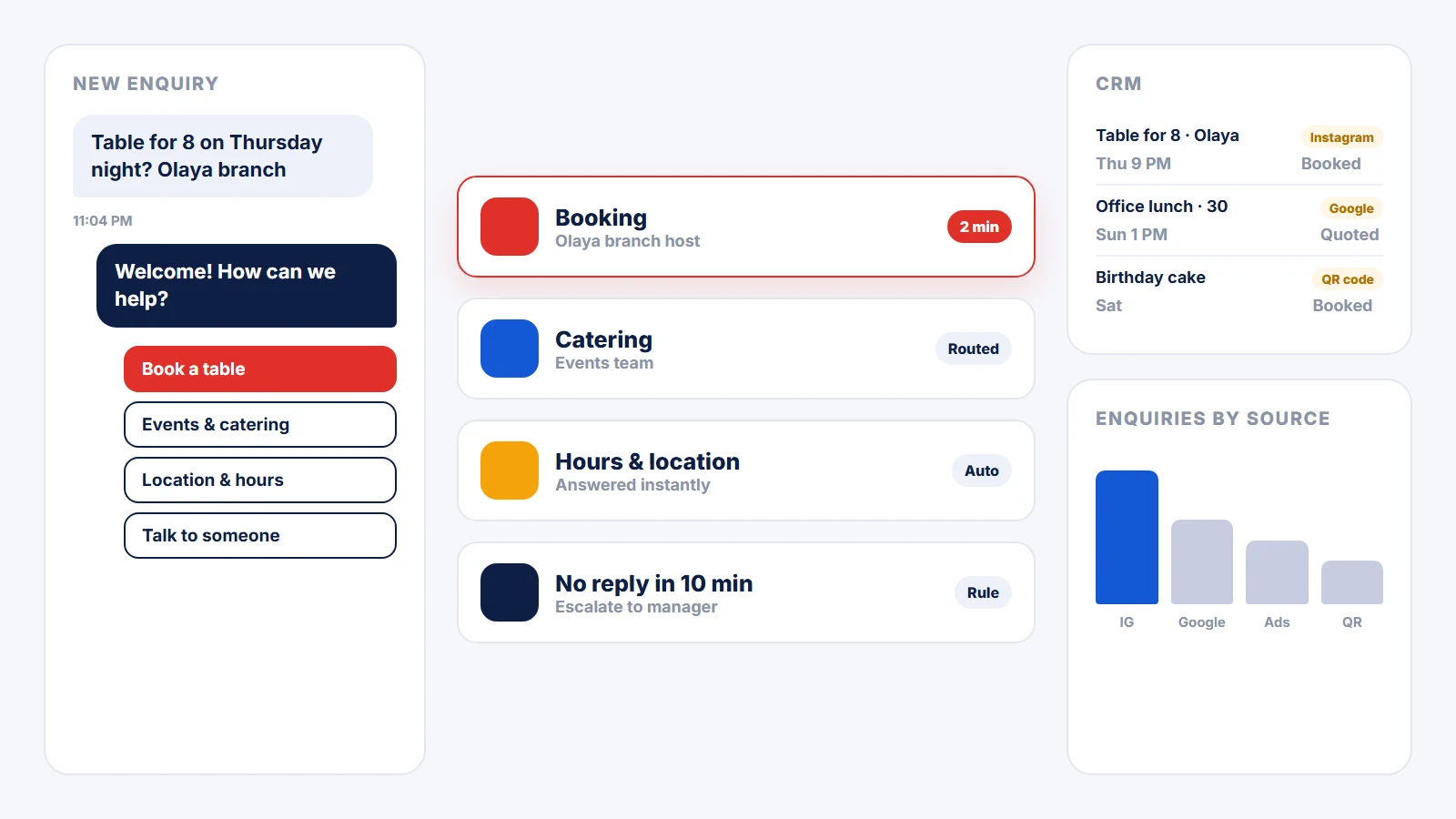
In Saudi Arabia, guests do not email a restaurant. They message it on WhatsApp: a table for eight on Thursday night, a birthday cake, catering for an office lunch, whether the family section is open, where exactly the branch is. For most restaurants those messages land on one shared phone, get answered when someone has a free moment, and disappear into a chat history nobody reviews. The enquiry with the highest intent the restaurant receives all day is also the easiest one to lose.
WhatsApp automation fixes the handling, not the hospitality. Done well, it answers the simple questions instantly, routes the real ones to the right person while the guest is still deciding, records every enquiry with where it came from, and shows the team at the end of the month what guests actually asked for. The guest still talks to people. They just stop waiting for them.
This guide covers what restaurant enquiries look like on WhatsApp, when the regular WhatsApp Business app is enough, the five automations worth building first, how to connect them to a CRM and a dashboard, and the rules that keep it on the right side of guests and of Meta.
What restaurant enquiries look like on WhatsApp
Before automating anything, look at two weeks of messages and sort them. Most restaurants find the same handful of types, and each one needs different handling:
- Table bookings, especially for groups, weekends and occasions.
- Events and catering: private dining, office orders, birthdays, gatherings at home.
- Quick questions: opening hours, location, parking, the family section, whether a dish is spicy or contains nuts.
- Delivery issues: a late or wrong order placed through a delivery app.
- Everything else: job applications, suppliers, partnership offers.
Quick questions can be answered automatically. Bookings and catering are revenue and need a person quickly. Delivery issues need a calm, fast reply before they become a public review. Sorting the messages first shows where automation saves time and where it would only get in the way.
The WhatsApp Business app or the WhatsApp Business Platform?
The free WhatsApp Business app is enough for a single branch where one person answers the phone. It has a business profile, quick replies, labels and an away message, and for a small café that may be all it needs.
The WhatsApp Business Platform (often called the WhatsApp Business API) is what you need when any of these are true:
- More than one person or branch answers enquiries, and you need to know who is handling what.
- You want enquiries to reach a CRM or a sheet automatically, with their source attached.
- You want to send booking confirmations and reminders automatically, using templates Meta has approved.
- You want reporting: how many enquiries, from where, how fast they were answered, and how many became bookings.
The platform is reached through Meta directly or through a provider, and it is the foundation for everything below.
Five automations worth building first
1. An instant reply with clear options
The first message a guest receives should arrive in seconds, even at 11 pm. It welcomes them and offers a short menu: book a table, events and catering, location and hours, a problem with an order, or talk to someone. Location, hours and the menu link are answered on the spot. Everything else moves to the next step with the guest's choice already recorded.
2. Routing to the right branch and person
A booking at the Olaya branch should reach the Olaya branch, not a general inbox. Routing sends each enquiry to the right branch or team and notifies them where they will actually see it. A good rule also escalates: if nobody has replied within a set number of minutes, the enquiry goes to a manager. This is where most of the value is, because a booking request answered in five minutes is far more likely to become a booking than one answered the next morning.
3. Every enquiry captured with its source
Use a different click-to-WhatsApp link, with its own prefilled message, for each place a guest can find you: the Instagram bio, a paid ad, the Google Business Profile, the website button, the QR code on the table. When the conversation starts, the enquiry is written to the CRM with that source attached. At the end of the month you can see which channel brought catering enquiries, not just followers.
4. Confirmations and reminders
Once a booking is confirmed, an automatic message confirms the date, time, number of guests and branch, with a location link. A reminder on the day gives the guest an easy way to confirm or cancel, which frees the table for someone else instead of holding it for a no-show. Because these are business-initiated messages, they are sent as templates approved by Meta.
5. A thank-you and a review request after the visit
A short message after the visit, thanking the guest and linking to your Google Business Profile, turns satisfied guests into reviews. Ask every guest the same way. Google's policies do not allow offering rewards for reviews or only asking guests you expect to be happy, so the request has to go to everyone and promise nothing in return.
Connecting it to a CRM
A CRM does not need to be complicated to be useful. For a restaurant it is the list of every enquiry with enough detail to act on and learn from:
- name and phone number
- source (Instagram, ad, Google, website, QR code)
- branch and enquiry type
- date and requested time or event date
- outcome: booked, quoted, no answer, lost, and why
If you already use a CRM such as HubSpot or Zoho, connect to it rather than replacing it. If you do not, a well-structured Google Sheet is a perfectly good start. The tool matters less than the rule that every enquiry gets logged the same way. We use n8n to connect WhatsApp, forms, sheets, the CRM and team notifications, because the workflows stay visible and editable instead of being locked inside one platform.
Reporting that runs itself
A Looker Studio dashboard connected to that CRM or sheet replaces the report someone rebuilds by hand every month. The numbers worth watching:
- Enquiries per week, by source and by branch.
- First response time, especially for bookings and catering.
- Enquiries that became bookings or orders, by source.
- The most common questions, which tell you what to put in your highlights, on your website and on the menu.
That last one is easy to overlook. If dozens of guests ask about parking every month, the answer belongs in your content plan and your Google profile, not only in a WhatsApp reply.
Rules to stay on the right side of guests and Meta
- Opt-in first. Send offers and announcements only to guests who agreed to receive them, as marketing templates. A booking confirmation is not permission to send promotions.
- Respect the 24-hour window. Free-form replies are for conversations a guest started recently. Outside that window, messages must use an approved template, and Meta charges for template messages by category and country.
- Always offer a person. "Talk to someone" should be one tap away in every flow. Never present a bot as a member of staff.
- Collect only what you need. Saudi Arabia's Personal Data Protection Law (PDPL) applies to guest data. Store what serves the booking and the follow-up, tell guests how it is used, and give them an easy way to stop messages.
A sensible order to build it
1. Map two weeks of enquiries and agree who owns each type at each branch. 2. Set up the WhatsApp Business Platform and your business profile. 3. Build the instant reply and routing, including the escalation rule. 4. Connect the CRM or sheet and the source links. 5. Add confirmations, reminders and the review request once the basics run smoothly. 6. Turn on the dashboard and review it every month with the team.
Each step works on its own, so the restaurant gets value from the first one instead of waiting for the whole system.
How nibras approaches it
nibras builds WhatsApp Business API flows, CRM integration, n8n workflows connecting forms, sheets, the CRM and team notifications, and Looker Studio dashboards that assemble themselves. We design the automation around how the team actually works and what guests actually ask, because automating a broken process only makes it fail faster. The details are on our marketing automation service page. Automation works best when what feeds it is strong too: social media management and paid campaigns that bring guests to the conversation, and a website that sends them there with one tap.
Frequently Asked Questions
Is the WhatsApp Business app enough for a restaurant? For a single branch where one person answers every message, often yes. Once several people or branches share enquiries, or you want bookings logged in a CRM, automatic confirmations and reporting, you need the WhatsApp Business Platform.
Will automation make our restaurant feel robotic? Not if it is designed to hand over quickly. Automation should answer simple questions instantly and route everything else to a person, with "talk to someone" always one tap away. Guests notice slow replies far more than they notice a helpful automatic one.
Can we send offers to every guest who ever messaged us? No. Promotional messages should only go to guests who opted in to receive them, and they are sent as approved marketing templates. A guest who messaged once about a booking has not agreed to receive offers.
Do we need a new CRM? Usually not. If you already use one, the automation connects to it. If you do not, a well-structured Google Sheet works as a start, as long as every enquiry is logged the same way with its source and outcome.
What should a restaurant automate first? The instant reply and routing. Answering simple questions immediately and getting booking and catering enquiries to the right person within minutes is where most restaurants see the difference first.
The nibras newsletter
Practical articles on marketing, branding and search visibility, sent to your inbox. No spam, and you can unsubscribe in one click.

Want our new articles first?
Grow Your Brand in KSA
Work with nibras in Riyadh. Let our experts shape your strategy, premium content, and advertising campaigns for Saudi markets.